Smart Home Security Devices (2026 Guide) Buying Tips

Smart home security systems have changed how homeowners protect their properties, combining real-time monitoring, automation, and remote access into one connected solution. Instead of relying on basic alarms alone, today’s smart security devices offer cameras, sensors, mobile alerts, and flexible monitoring options that adapt to modern lifestyles. Whether you want a DIY setup or professional monitoring, understanding how smart home security systems work and which options fit your needs can help you choose protection that is both effective and future-ready.
What Is Smart Home Security?
What is smart home security, a home security system, IoT home security
Smart home security refers to a network of connected devices that monitor, detect, and respond to activity inside and around a home. These systems rely on internet-connected sensors, cameras, alarms, and control hubs that allow homeowners to monitor their property remotely using a smartphone or computer.
Unlike traditional home security systems, smart home security devices use IoT technology to deliver instant alerts, live video access, and automation features. This allows faster response to threats and greater control without being physically present.
Benefits of Smart Security Devices
Home security devices increase awareness, reduce response time, and discourage unauthorized access. Visible cameras, alarms, and smart locks significantly lower the risk. Remote monitoring and instant alerts make smart security a practical investment.
Is it good to have home security devices?
Home security devices add value by increasing awareness, reducing response time, and discouraging unauthorized access. For most households, the ability to monitor activity remotely and receive instant alerts makes smart security a practical and worthwhile investment.
Real-Time Alerts and Visibility
Smart security devices deliver instant notifications when movement, sound, or entry activity occurs. Live video access allows users to confirm events quickly, reducing false alarms and improving response accuracy.
Deterrence and Prevention
Cameras, motion-activated lighting, and audible alarms create visible deterrents that reduce the risk of intrusion. Homes equipped with smart security devices are less likely to be targeted due to increased detection risk.
Custom Automation
Smart devices can operate together through automated rules. Motion detection can activate cameras, lights, and alarms simultaneously, improving coverage and reducing response time without manual input.


Key Types of Smart Home Security Devices
Smart home security devices help protect your house with modern technology. They offer peace of mind by watching over your home all day. These devices work together to keep your property safe and secure. Knowing the key types of smart security devices helps you choose the right ones for your needs.
Smart Cameras
Smart cameras capture video inside and outside your home. They send live footage directly to your phone. Some cameras have night vision to see clearly in the dark. Motion detection alerts you to any movement near your home. These cameras often include two-way audio to talk and listen.
Smart Locks
Smart locks replace traditional keys with digital access. You can lock or unlock doors remotely using an app. They allow temporary codes for guests or service workers. Many smart locks log who enters and leaves your home. They improve convenience and add an extra layer of security.
Motion Sensors
Motion sensors detect movement within a certain area. They trigger alerts or alarms if someone enters your home unexpectedly. These sensors can turn on lights to scare off intruders. Smart motion sensors help monitor both indoor and outdoor spaces.
Alarm Systems
Smart alarm systems notify you of break-ins or emergencies instantly. They connect with cameras, locks, and sensors to act fast. Alarms can alert you, neighbors, or security services. Many systems include loud sirens to deter criminals. They are a critical part of home security setups.
Smart Security Cameras
smart home security devices with cameras, cctv home security devices, best affordable security camera
Indoor and Outdoor Camera Coverage
Indoor cameras help monitor living areas, while outdoor cameras protect entry points and yards. Weather-resistant designs and wide-angle lenses improve outdoor visibility.
Video Doorbells for Entry Monitoring
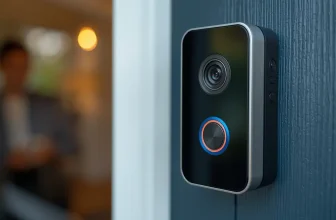
Video doorbells allow users to see, hear, and speak with visitors remotely. This improves package security and helps identify unexpected visitors.
(Internal link fits naturally on video doorbells → best video doorbell article)
Storage and Privacy Options
Some cameras store footage locally, while others rely on cloud storage. Local storage reduces monthly costs, while cloud storage offers easier access and backup options.
How to Choose the Right Smart Home Security Devices
Choosing the right smart home security devices is important for protecting your home. Different homes have different needs. Picking devices that fit your lifestyle and house size keeps your home safe and comfortable.
Not every device works well with every smart home system. It helps to know which devices can connect easily. Budget also plays a big role in choosing the right devices. Spending wisely ensures good protection without overspending.
Assessing Your Security Needs
Start by identifying your home’s weak points. Check doors, windows, and outdoor areas. Think about your daily routine and when you are away. Decide if you need cameras, alarms, or sensors. Choose devices that cover all vulnerable spots well.
Compatibility With Smart Home Systems
Smart devices must work with your current system. Some devices only connect with certain brands. Check if your phone or tablet supports the device app. Select devices that are compatible with your current smart home ecosystem. This makes control easy and fast.
Budget Considerations
Set a clear budget before buying. Compare prices of different brands and features. Buy devices that offer good quality within your price range. Avoid overspending on features you do not need. Balance cost and security to get the best value.
Installation, Setup, and Maintenance
Setting up smart home security devices is easier than it seems. Proper installation ensures these devices work well and protect your home effectively. Follow simple tips to place, connect, and configure your devices for the best results.
Placement Strategies
Position devices where they can monitor key areas clearly. Place cameras near entrances, windows, and hallways. Avoid spots with direct sunlight or strong glare to keep the video clear. Sensors should be on doors or windows that open often. Higher placements reduce tampering risks and improve coverage.
Connecting To Wi-fi
Use a stable Wi-Fi network for smooth device operation. Ensure the signal strength is strong where devices are installed. Place your router centrally or use Wi-Fi extenders to boost coverage. Follow device instructions to connect to your home network securely. Keep your network password safe and private.
Configuring Alerts And Automation
Set alerts to notify you instantly of any unusual activity. Customize notifications based on your needs and schedule. Automate devices to work together, like turning on lights when sensors detect movement. Test alerts regularly to confirm they reach your phone or email. Automation improves security and makes your home smarter.
Maintaining And Upgrading Security
Maintaining and upgrading your smart home security devices keeps your home safe and efficient. Technology changes fast. Staying updated prevents security gaps. Regular care makes devices last longer and work better. Small efforts protect your home from threats.
Regular Firmware Updates
Firmware updates fix bugs and improve features. They protect against new security risks. Many devices update automatically. Check settings often to ensure updates run. Skipping updates leaves devices vulnerable to attacks.
Battery And Power Management
Smart devices rely on steady power. Low batteries cause failures and false alarms. Replace or recharge batteries regularly. Use power-saving modes if available. Keep backup power options ready for outages.
Integrating New Technologies
New devices offer better protection and ease. Add compatible gadgets to expand your system. Voice control and AI enhance security checks. Test new tools before full use. Upgrade parts to keep your system modern.

Smart Home Security Devices vs Traditional Security Systems
Monitoring and Control Differences
Traditional security systems rely on fixed control panels and preset monitoring schedules. Smart home security devices provide app-based control, instant alerts, and remote access from any location. Users can view live camera feeds, manage door locks, and trigger alarms in real time, improving response speed and situational awareness.
Installation, Flexibility, and Cost
Smart security systems are typically easy to install and allow devices to be added or removed without technical support. Traditional systems often require professional installation and ongoing contracts. This flexibility lowers upfront costs and makes smart home security a suitable choice for both renters and long-term homeowners.
Popular Smart Home Security Brands and Systems
Ring Home Security Systems
Ring Alarm Pro and the Ring Alarm Security Kit combine cameras, sensors, and alarms into an expandable system. Strong Alexa integration and straightforward setup make Ring a practical option for users who want scalable protection.
Pros
- Affordable starter kits with DIY installation and expandable components.
- Strong ecosystem with wide third-party support, including doorbells, cameras, and alarms.
- Multiple subscription tiers let users choose cloud storage and professional monitoring levels.
Cons
- Many advanced features (like extended video history or 24/7 monitoring) require a paid plan.
- Subscription costs can add up with professional monitoring and additional AI features.
Ring Systems Pricing
Ring starter kits typically range from $199 to $399, depending on the number of sensors and cameras included. The optional Ring Protect subscription for cloud storage and advanced features starts at $4.99 per month, while professional monitoring plans are higher, depending on coverage.
Google Home Security Devices
Google Nest cameras and sensors integrate smoothly with Google Assistant and the wider Google Home ecosystem. These devices suit users who want consistent performance and centralized control through Android-based platforms.
Pros
- Tight integration with Google Home and intelligent detection features when paired with a subscription.
- Wide range of indoor and outdoor cameras with quality video and useful app controls.
Cons
- Video recording history and advanced features usually require a paid subscription (Nest Aware).
- Subscription prices have been rising, which may reduce long-term value for some users.
Google Nest Pricing
Nest cameras and sensors are priced between $99 and $279 per device, depending on indoor or outdoor models. Nest Aware subscription plans for extended video history start at $10 per month, or $100 annually for full-feature access.
Apple Home Security Devices
Apple HomeKit-compatible devices emphasize local control and data protection. Cameras and sensors can operate with minimal cloud dependence, appealing to users focused on privacy and encrypted communication.
Pros
- Strong privacy and encrypted data handling, with local control via Apple HomeKit.
- Good ecosystem if users already use Apple devices.
Cons
- Compatible devices are often more limited in selection compared with other platforms.
- Some advanced features may require additional accessories or third-party hubs.
Apple HomeKit-Compatible Devices Pricing
Pricing for HomeKit-compatible security devices varies by manufacturer. Cameras and sensors generally start around $150–$250 per device. There is no unified subscription; costs depend on the chosen manufacturer and whether cloud storage is required.

Professional Smart Home Security Systems
Professional smart home security systems are built for homeowners who want continuous monitoring, expert installation, and dependable long-term protection. The best professional home security system typically combines 24/7 monitoring, certified equipment, and structured service plans. These systems are ideal for users who prioritize reliability, support, and advanced features over DIY flexibility.
ADT Home Security Devices
ADT home security devices focus on professionally managed protection backed by decades of industry experience. The system is designed for users who want stable performance, fast emergency response, and a nationwide monitoring infrastructure.
Pros
- Reliable 24/7 professional monitoring
- Strong emergency response reputation
- Wide range of compatible security devices
Cons
- Long-term contracts are common
- Higher overall cost compared to DIY systems
Pricing Overview
ADT pricing typically includes upfront equipment costs plus monthly monitoring fees. Monthly plans are generally higher than DIY alternatives, reflecting professional installation, monitoring services, and ongoing support.
Vivint Smart Home Security
Vivint smart home security combines professional monitoring with advanced smart home automation. It is well-suited for users who want security, cameras, and automation managed through a single, integrated platform.
Pros
- Advanced camera and video analytics
- Seamless automation with smart home devices
- Intuitive control panel and mobile app
Cons
- Higher equipment costs
- Limited flexibility for users who want self-monitoring only
Pricing Overview
Vivint systems usually involve premium equipment pricing paired with monthly monitoring plans. Costs are higher than basic alarm systems but align with users seeking high-end automation and smart security features.
Telus Smart Home Security
Telus smart home security offers a professionally monitored solution with strong telecom integration. It appeals primarily to users in supported regions who prefer bundled services under a single provider.
Pros
- Integration with existing telecom services
- Professional installation and monitoring
- Streamlined billing for bundled customers
Cons
- Limited regional availability
- Smaller device ecosystem compared to global brands
Pricing Overview
Telus pricing varies by region and bundle options. Monthly costs are competitive within supported areas, especially for users already subscribed to Telus communication services.
ADT vs Vivint vs Telus: Which Should You Choose?
- Choose ADT if long-term reliability and nationwide professional monitoring are your top priorities.
- Choose Vivint if you want advanced smart home automation paired with professional security.
- Choose Telus if you prefer a bundled solution with telecom integration and regional support.

DIY Smart Security Systems
SimpliSafe Home Security System
SimpliSafe is a popular choice for homeowners who want quick setup and control without long-term commitments. The system supports self-monitoring and optional professional monitoring, making it suitable for users who value flexibility and predictable costs. SimpliSafe suits homeowners looking for the best home security system without a subscription that remains flexible. It offers fast setup, self-monitoring, and optional professional monitoring without forcing long-term contracts.
Pros
- Easy DIY installation with no contract requirements
- Optional professional monitoring at a predictable monthly cost
- Reliable performance for apartments and single-family homes
Cons
- Advanced features require a paid monitoring plan
- Limited customization compared to fully integrated smart home platforms
SimpliSafe Home Security System Pricing
SimpliSafe starter kits usually cost between $199 and $250, depending on the number of sensors included. Optional professional monitoring starts at $14.99 per month, while self-monitoring remains free, giving users flexibility to control costs.
Cove Security Systems
Cove is built for affordability and straightforward use. Its equipment is easy to install, and monitoring plans are simple, which appeals to users looking for basic protection without complex features or high monthly fees. Cove is aimed at buyers who want affordable security systems for home use without a complex setup. The system focuses on essential protection with simple equipment and clear pricing.
Pros
- Low upfront equipment costs
- Simple monitoring plans with no hidden fees
- Quick installation for first-time users
Cons
- Fewer device and automation options
- Not ideal for advanced smart home integrations
Cove Security Systems Pricing
Cove systems start around $150 for basic equipment. Monitoring plans are simple and affordable, beginning at $9.99 per month, making it a low-cost option for first-time smart home security buyers.
Abode Security System
Abode is designed for users who already use smart home automation. It supports broad device integration and flexible monitoring options, making it a strong option for households that want security to work alongside existing smart devices. Abode appeals to users searching for a smart home security system without a subscription that works well with automation platforms. It integrates easily with existing smart devices and supports flexible monitoring options.
Pros
- Strong compatibility with smart home ecosystems
- Supports self-monitoring with no required monthly fee
- Flexible setup for advanced users
Cons
- The interface may feel complex for beginners
- Professional monitoring costs more than basic DIY systems
Abode Security System Pricing
Abode kits typically start at $200 for a basic package. Users can choose free self-monitoring or professional plans that range from $15 to $25 per month, depending on the number of connected devices and features selected.

Pricing and Monthly Costs of Home Security
Understanding how much home security costs per month helps users plan effectively. Total expenses depend on equipment selection and whether monitoring services are included. Clear cost expectations prevent overspending while ensuring adequate protection.
Equipment Costs
Equipment pricing varies based on system size and features. Cameras, sensors, and control hubs are usually purchased upfront, with costs increasing as coverage expands across the home.
Monitoring Fees
Monitoring costs depend on the chosen service model. Self-monitoring options often have no monthly fee, while professional plans charge a recurring amount for 24/7 response. Typical monthly ranges vary based on coverage level and added features.
Smart Home Security Risks and Safety Concerns
Data Privacy and Account Protection
Smart home security devices store sensitive data, including video footage and access logs. Using strong, unique passwords and enabling two-factor authentication helps prevent unauthorized access. Limiting account sharing and reviewing login activity further reduces privacy risks.
Network Security
Smart security systems depend on a stable and secure Wi-Fi network. Weak passwords, outdated routers, or unpatched devices increase exposure to attacks. Many users isolate smart devices on a separate network to contain potential breaches. Keeping firmware updated and using modern encryption standards strengthens overall system security.
Home Security Alarm Systems and Anti-Theft Protection
Home security alarm systems form the core of many security systems for home use. They detect unauthorized activity and respond immediately through alerts or audible warnings. A reliable anti-theft alarm for home use helps reduce intrusion risk by notifying occupants and discouraging potential intruders before damage occurs.
Smart Sirens and Motion-Triggered Alarms
Smart sirens and motion-triggered alarms activate when unexpected movement is detected. Loud alerts draw attention and act as an immediate deterrent, while mobile notifications keep homeowners informed in real time. These alarms often integrate with other home alarm systems to strengthen overall response.
Door and Window Sensors
Door and window sensors provide first-line intrusion alerts at common entry points. They trigger notifications as soon as an entry is opened, allowing quick action before an intruder moves further inside the home.
Smart Locks and Access Control
Smart locks add controlled access to smart home security devices by replacing physical keys with digital entry options. They improve security management by allowing users to monitor and control access remotely while reducing the risks associated with lost or copied keys.
Smart Locks vs Physical Keys
Smart locks support temporary access codes and time-based permissions for guests or service providers. Entry logs show when doors are locked or unlocked, offering clear visibility into access activity. For homes already using connected security devices, smart locks integrate easily with broader automation setups.
Real-World Use Cases for Smart Home Security Devices
Smart home security devices solve practical, everyday problems beyond break-in prevention. Video doorbells reduce package theft by allowing remote interaction with visitors. Indoor cameras allow you to keep an eye on children, pets, and elderly family members inside the home.
Motion sensors and smart locks support short-term rentals by tracking entry activity. For frequent travelers, remote access and alerts provide reassurance while away from home.

Top Home Security Systems
What Are the Top Five Home Security Systems?
The top home security systems are defined by usability, reliability, and long-term value rather than brand recognition alone. A strong system should balance ease of setup, reasonable costs, dependable monitoring options, and stable app performance. Device compatibility and expansion options also matter, especially for users planning to scale their security over time.
When comparing the top five home security systems, focus on how well each option performs across these key criteria rather than relying on marketing claims.
Comparison Table: Smart Home Security System Types
| Feature | DIY Smart Security Systems | Professional Security Systems |
| Installation | Self-installed | Professionally installed |
| Monthly Cost | Optional or low | Higher, ongoing fees |
| Contracts | No long-term contracts | Often required |
| Monitoring | Self or optional professional | 24/7 professional |
| Flexibility | Easy to expand or modify | Limited changes |
| Best For | Budget-conscious users, renters | Large homes, full-service security |
Who Should Buy Smart Home Security Devices
You should consider smart home security devices if you:
- Want remote monitoring and alerts on your phone or tablet?
- Prefer flexible installation without professional setup.
- Live in an area where visible deterrence (cameras, alarms) reduces break-in risk.
- Want to integrate security with other smart home tech (smart lights, locks, assistants).
- Are budget conscious and prefer to choose devices individually.
- Rent your home but still want security control without long contracts.
Examples of good candidates:
- Busy families who want 24/7 visibility of activity.
- Homeowners who travel often and need remote access.
- Renters or DIY users who prefer no professional installation.
Who Should Avoid (or Be Cautious With) Smart Home Security Devices
Smart home security may not be ideal if you:
- Do not have reliable internet or Wi-Fi, since most smart features depend on connectivity.
- Prefer a fully professional installation and support included in the price.
- Want zero responsibility for monitoring or maintenance, including firmware updates.
- Require a guaranteed emergency response through a monitoring center.
- Have very limited technical experience and do not want to manage apps or settings.
Examples of situations where caution makes sense:
- Homes without stable Wi-Fi throughout the property.
- Users who want hands-off protection with 24/7 professional monitoring included.
- Anyone uncomfortable managing device updates, app settings, or automation rules.
Common Mistakes to Avoid When Buying Smart Security Devices
Many buyers focus only on camera quality and overlook system compatibility, ongoing monitoring costs, and network security. Choosing devices that do not integrate with existing smart home platforms or ignoring subscription fees can lead to higher long-term costs and limited functionality.

How Long Do Smart Security Devices Last?
Most smart home security devices last between five and ten years, depending on build quality, usage, and software support. Regular firmware updates, proper maintenance, and timely battery replacement help extend device lifespan and maintain reliable performance.
Short Pros and Cons Summary
| Pros | Cons |
| Remote monitoring and instant alerts | Many features require subscriptions |
| Flexible device expansion | Dependent on stable internet |
| Strong deterrence against break-ins | Privacy concerns if poorly secured |
| Easy integration with smart homes | Initial equipment costs can vary |
Quick Comparison Snapshot
| System | Typical Starter Cost | Subscription Needed? | Professional Monitoring |
| Ring | $199+ | Optional (for video history, AI, pro monitoring) | Yes |
| Google Nest | $99+ | Usually required for extended video | No |
| Apple HomeKit | Varies | Depends on the manufacturer | Depends on the system |
| Arlo | $124+ | Optional for cloud storage/features | Yes (optional) |

Smart Home Security System Projects
Smart home security system projects focus on designing and testing connected security setups for learning, planning, or small-scale deployment. These projects often combine cameras, sensors, alarms, and control apps to demonstrate how smart security systems function in real-world environments. Many users document their work in a smart home security system project PDF for reference, presentation, or educational use.
Educational and DIY Use Cases
Smart home security projects are commonly used to understand automation logic, device communication, and alert workflows. DIY setups also allow small-scale deployments for apartments, home offices, or testing environments, helping users evaluate device compatibility and performance before committing to a full system.
Key Features & Considerations Before Buying
Before choosing a smart home security system, focus on features that directly affect daily use and long-term value. Reliable mobile alerts, stable app performance, and device compatibility matter more than extra features you may never use. Storage options, monitoring flexibility, and upgrade paths should also align with how much control and responsibility you want over your system.
Top-Rated Home Security Devices (Editor’s Picks)
Some smart security devices consistently perform well across different home types and budgets. Camera systems with reliable motion detection and clear night vision stand out for visual monitoring. Alarm systems that combine loud sirens with instant mobile alerts provide fast threat awareness. Smart locks with temporary access codes are highly rated for managing guests and service providers without sharing physical keys.
How to Choose the Right Smart Home Security Setup
Choosing the right setup depends on how you plan to use your system. Smaller homes and rentals benefit from flexible DIY systems with self-monitoring options. Larger homes may require professional monitoring and broader device coverage. Prioritize systems that match your technical comfort level, support future expansion, and fit your monthly cost expectations.
Quick Comparison Summary
Smart home security systems offer flexibility, control, and scalable protection. DIY systems suit renters and budget-focused users, while professional systems deliver structured monitoring and hands-off management. Privacy-focused users benefit from local storage and encrypted platforms, while automation-focused households gain value from systems that integrate with existing smart devices.
Maintenance Checklist for Long-Term Security
Maintaining smart home security devices requires minimal but consistent effort. Check firmware updates monthly to patch vulnerabilities. Replace or recharge batteries on schedule to prevent device failure. Review alert settings periodically to avoid missed notifications or false alarms. Simple maintenance ensures reliable performance over time.
Top Picks by Category
- Best for Renters: DIY systems with no contracts and easy removal
- Best No-Subscription Option: Systems offering free self-monitoring
- Best Professional Security: Fully monitored systems with emergency response
- Best Privacy-Focused Setup: Devices with local storage and encrypted control
- Best Budget Choice: Affordable starter kits with optional upgrades

Recommendation
The best smart home security setup is one that fits your home layout, monitoring preference, and budget without unnecessary complexity. Users who value flexibility should focus on DIY systems with optional monitoring, while those seeking hands-off protection may prefer professional solutions. Choosing compatible, expandable devices ensures your system remains effective as your needs evolve.
Frequently Asked Questions
What Are The Best Smart Home Security Devices Available?
Top devices include smart cameras, doorbells, sensors, and alarms that connect to your phone for easy control.
How Do Smart Home Security Devices Work?
They use Wi-Fi or Bluetooth to send alerts and live video to your phone or other devices.
Can Smart Security Devices Prevent Home Break-ins?
Yes, visible cameras and alarms can scare off intruders and notify you quickly of any threats.
Are Smart Home Security Devices Easy To Install?
Most devices are simple to set up with apps and need little or no wiring.
Do Smart Security Devices Work Without Internet?
Some devices have limited features offline, but full functionality usually needs a stable internet connection.
Conclusion
Smart home security systems provide a practical balance between protection, convenience, and control. From smart alarms and cameras to locks and monitoring plans, the right setup depends on your budget, home size, and preferred level of involvement. By comparing device types, understanding costs, and addressing security risks upfront, you can build a system that enhances safety without unnecessary complexity. A well-chosen smart security solution not only deters threats but also gives lasting peace of mind through reliable, connected protection.
Author Bio
Israt Jahan is a home technology researcher focused on smart security systems, connected devices, and practical home automation. This guide is based on product comparisons, user experience analysis, and current smart home security standards.