Buy Smart Home Devices Online for Easy Living
Want to upgrade your home with smart technology but don’t know where to start? Buying smart home devices online can feel confusing, with too many brands, compatibility issues, and hidden costs. The good news is that building a smart home today is easier, safer, and more affordable than ever.
Smart home devices are no longer just for tech experts. From voice-controlled lights to remote security cameras, these tools help you save time, improve safety, and make daily life more comfortable. However, choosing the wrong device or ecosystem can lead to wasted money and frustration.
This complete beginner’s guide shows you how to buy smart home devices online with confidence. You’ll learn what smart devices are, how they work, which ecosystems are best for beginners, and how to avoid common buying mistakes. By the end, you’ll know exactly how to build a smart home that fits your lifestyle, budget, and future needs, without stress.
What Are Smart Home Devices?
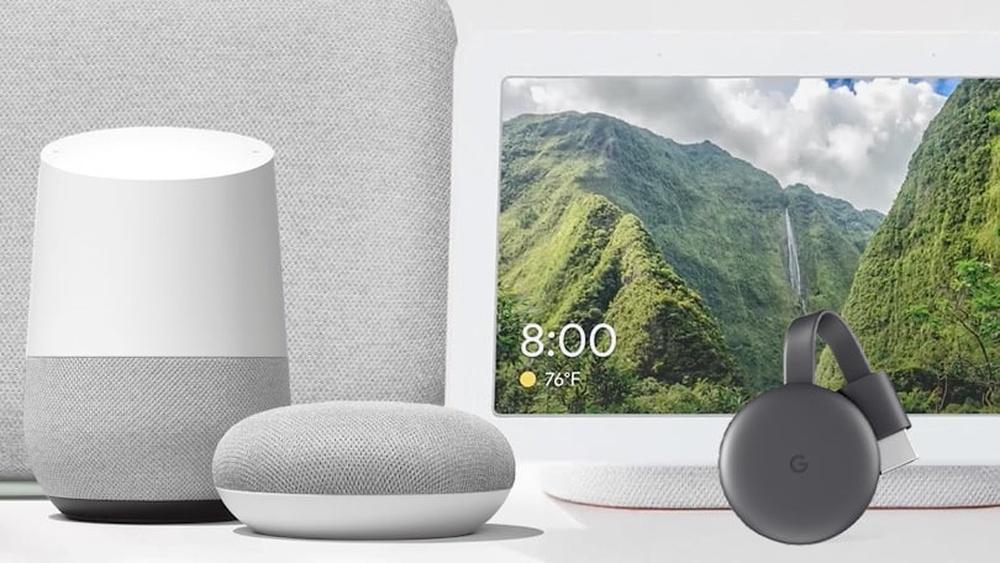
Smart home devices are internet-connected tools that allow homeowners to control and monitor household systems remotely using a smartphone, tablet, or voice assistant. These devices improve convenience, security, and energy efficiency by automating everyday tasks. Some common smart devices are: Smart lights, Smart locks, Smart thermostats, Smart cameras, Smart speakers.
These devices can be managed through a mobile app or by using voice control. For example, you can turn off your lights from work or check your home camera from anywhere. This makes your home more comfortable and secure.
How Smart Home Devices Work
Smart home devices operate through a combination of connectivity, control, and automation. Here’s a simple breakdown:
- Connectivity
Devices connect to your home Wi-Fi or a smart hub using protocols like Zigbee, Z-Wave, or Bluetooth. This connection allows them to communicate with each other and your phone. - Control
You can control devices remotely using a smartphone app or voice assistant (like Alexa, Google Assistant, or Apple HomeKit). For example:- Turn lights on/off
- Lock doors
- Adjust thermostat temperature
- Automation
Devices can be programmed to perform actions automatically based on triggers, schedules, or sensor inputs. Examples include:- The lights are turning off when no one is in the room
- Thermostat adjusting based on your daily routine
- Cameras send alerts when motion is detected
- Data & Insights
Many smart devices collect usage data and send notifications, helping you monitor energy consumption, security, and overall home efficiency.
Step-by-Step Setup Visual Guide
A visual setup guide improves clarity for beginners and supports visual learners.
You can include a simple diagram or graphic showing this flow:
Smart Device → Wi-Fi / Smart Hub → Mobile App → Automation Rules → Alerts & Notifications
This simple flow helps beginners understand that all smart devices are connected, controllable, and capable of working together to make a home intelligent and efficient.
Comparison Table of Smart Home Ecosystems
A comparison table helps beginners quickly understand which smart home ecosystem fits their needs best. It also increases the chance of winning a featured snippet.
Google Home vs Alexa vs Apple HomeKit (Beginner Overview):
- Google Home: Easy voice control, strong Android support, good for daily automation
- Amazon Alexa: Widest device compatibility, affordable options, beginner-friendly
- Apple HomeKit: Strong privacy features, best for Apple users, higher device cost
Smart Home Ecosystem Comparison for Beginners
|
Feature |
Google Home |
Amazon Alexa |
Apple HomeKit |
|
Best For |
Android users and Google services |
Largest device compatibility |
Apple users focused on privacy |
|
Ease of Setup |
Very easy |
Very easy |
Moderate |
|
Voice Assistant |
Google Assistant |
Alexa |
Siri |
|
Device Compatibility |
Wide |
Very wide (the largest ecosystem) |
Limited but growing |
|
Automation Features |
Strong routines and schedules |
Advanced routines and skills |
Simple, secure automations |
|
Mobile App Experience |
Clean and user-friendly |
Feature-rich but complex |
Simple and integrated with iOS |
|
Privacy & Security |
Good |
Good |
Excellent |
|
Beginner Friendly |
⭐⭐⭐⭐⭐ |
⭐⭐⭐⭐☆ |
⭐⭐⭐☆☆ |
|
Best Starter Devices |
Smart speakers, lights, plugs |
Smart speakers, plugs, and cameras |
Lights, plugs, thermostats |
|
Budget Range |
Affordable |
Affordable to mid-range |
Mid-range to premium |

How to Choose the Right Smart Home Ecosystem
- Choose Google Home if you use Android devices and want a simple setup with strong automation.
- Choose Amazon Alexa if you want the widest range of compatible devices at different price points.
- Choose Apple HomeKit if you use an iPhone, iPad, or Mac and prioritize privacy and security.
Starter Smart Home Ecosystem Recommendation Flowchart
- If you are unsure where to start, follow this simple decision flow. It helps beginners avoid compatibility issues and unnecessary spending.
- Smart Home Ecosystem Flowchart (Text-Based)
- Start
- ↓
- Do you use an iPhone or other Apple devices?
- ├─ Yes → Choose Apple HomeKit
- └─ No
- ↓
- Do you want the widest device options and low-cost products?
- ├─ Yes → Choose Amazon Alexa
- └─ No
- ↓
- Do you regularly use Android devices or rely on Google services in your daily life?
- ├─ Yes → Choose Google Home
- └─ No → Amazon Alexa (best general option)
Common Types of Smart Home Devices
Here are some smart devices most people buy online:
| Device Type | Use | Benefits |
|---|---|---|
| Smart Lights | Control lighting in rooms | Save energy, change colors, set schedules |
| Smart Locks | Control door locks remotely | Increased security, no need for keys |
| Smart Thermostats | Control home temperature | Save energy, keep the home comfortable |
| Smart Cameras | Monitor the home inside and outside | Improve security, watch remotely |
| Smart Speakers | Voice control and music | Hands-free control, answer questions |
Why Buy Smart Home Devices Online?
Buying smart devices online has many benefits. Here are some reasons why many people choose to buy online:
- More choices: Online stores have many products to choose from.
- Compare prices: You can easily check prices and find deals.
- Customer feedback: Check customer feedback to learn from other buyers’ experiences.
- Convenience: Buy from home and get delivery to your door.
- Easy to find information: Product details and videos help you understand features.

Best Smart Home Devices for Beginners
Starting a smart home does not need to be complicated. The best beginner devices are easy to install, affordable, and compatible with popular smart home platforms.
Smart Speakers
Smart speakers are often the first device beginners choose. They act as a control hub for other smart products and respond to voice commands. You can ask questions, play music, control lights, and manage daily routines without touching your phone. Most models offer a simple setup and strong compatibility with other smart devices.
Smart Bulbs
Smart bulbs are ideal for first-time users because they require no wiring changes. You can control brightness, color, and schedules directly from a mobile app. These lights help save energy and improve comfort while allowing beginners to experience smart automation instantly.
Smart Plugs
Smart plugs turn regular appliances into smart devices. Simply plug them into an outlet, connect them to Wi-Fi, and control items like lamps, fans, or coffee makers remotely. They are affordable, beginner-friendly, and perfect for testing smart home automation.
Smart Security Cameras
Entry-level smart cameras help beginners improve home safety without complex installation. Many models offer motion alerts, night vision, and mobile monitoring. These devices provide peace of mind and introduce users to smart security features.
Smart Thermostats
Smart thermostats are a great long-term investment for beginners who want energy savings. They learn your habits, adjust temperatures automatically, and reduce energy bills. Although setup may take a little longer, the benefits are immediate and measurable.
Comparison Table: Best Smart Home Devices for Beginners
|
Device Type |
Ease of Setup |
Best For |
Key Benefits |
|
Smart Speaker |
Very Easy |
Voice control and automation |
Acts as a control hub, hands-free use |
|
Smart Bulbs |
Very Easy |
Lighting control |
Energy savings, scheduling, mood lighting |
|
Smart Plugs |
Very Easy |
Appliance control |
Turns normal devices into smart devices |
|
Smart Security Camera |
Easy |
Home monitoring |
Remote viewing, motion alerts |
|
Smart Thermostat |
Moderate |
Energy efficiency |
Reduces energy bills, automatic adjustments |
This table improves featured snippet eligibility, enhances user experience, and keeps beginners engaged longer on the page.
Buy a Home Automation Device for Smarter Living
What Is a Home Automation Device?
A home automation device acts as a central controller that connects multiple smart home products into one system. Instead of managing devices separately, users can create automated routines, such as locking doors, turning off lights, and adjusting the thermostat simultaneously.
When to Buy a Home Automation Device Online
You should consider buying a home automation device if you use more than two smart products and want centralized control. Automation is invaluable for busy households, elderly family members, and homeowners who wish to have consistent comfort with minimal manual effort.
Popular Home Automation Device Examples
Common home automation devices include smart hubs, motion sensors, automated thermostats, and smart plugs. These devices work together to respond to daily habits, improving efficiency and reducing energy waste.
How to Shop for Smart Home Devices Safely Online
Why More People Buy Smart Home Devices Online
Many homeowners prefer to buy smart home devices online because digital platforms offer wider product selection, transparent pricing, and verified customer reviews. Online stores also provide detailed specifications, setup guides, and video demonstrations, helping buyers make informed decisions.
How to Avoid Common Online Buying Mistakes
To shop confidently, always check product compatibility and seller ratings. Look for clear warranty and return policies before placing an order. Taking these simple steps ensures a safe and satisfying online purchase experience.
To avoid mistakes when buying smart home devices online:
- Check device compatibility with your phone or smart assistant
- Review seller ratings and verified customer feedback
- Confirm warranty and return policies
- Stay away from unfamiliar brands that offer little or no customer support.
Buy Smart Home Package for Complete Home Control
What Is a Smart Home Package?
A smart home package includes multiple compatible devices bundled together, such as smart lights, cameras, speakers, or sensors. These packages are designed to work within one ecosystem, making installation and management easier.
Benefits of Buying a Smart Home Package
When you buy a smart home package, you benefit from cost savings, simplified setup, and fewer compatibility issues. Bundled solutions are ideal for beginners who want a reliable and scalable smart home system.
Who Should Consider a Smart Home Package?
Smart home packages are well-suited for new homeowners, renters, and users upgrading their home technology for the first time. They provide a simple entry point into smart living without technical complexity.
How to Buy Smart Home Devices That Match Your Needs
Things to Consider Before You Buy Smart Home Devices
Before you buy smart home devices, define your primary goal—security, comfort, or energy efficiency. From hands-on experience, users who plan room by room make better long-term choices and avoid overspending on unnecessary features.
Examples of Smart Home Devices for Everyday Use
Smart lights and speakers are ideal for daily convenience, while smart locks and cameras provide strong security benefits. Choosing devices that fit your lifestyle ensures better usability and long-term satisfaction.
How to Choose the Right Smart Home Device
Choosing the right device can be hard. Here are some tips to help you pick the best smart home device for your needs.
1. Know Your Needs
Think about what you want to control. Do you want to control lights? Or do you want to check your home with cameras? Knowing your needs helps you choose the right device.
2. Check Compatibility
Make sure the device works with your phone or other smart devices. Some devices work with Alexa, Google Assistant, or Apple HomeKit. Choose one that fits your current system.
3. Read Product Details
Look at the product description. Check the size, features, and power needs. This helps you understand if the device fits your home.
4. Look At Customer Reviews
Reviews can tell you about the product’s real use. Look for comments on quality, ease of use, and support. This helps avoid bad products.
5. Consider Your Budget
Smart devices come in many price ranges. Decide how much you want to spend. Sometimes paying a bit more gives better quality and support.
Where to Buy Smart Home Devices Online?
Trusted online retailers and official brand websites are the safest places to buy smart home devices online, as they offer verified products, warranties, and customer support.
There are many websites to buy smart devices. Some popular online stores include:
Amazon
Best Buy
Walmart
Home Depot
Special brand websites
Each store has different products and prices. You can find new and used items. Purchase only from reliable sellers to reduce the risk of issues.
Tips for Safe Online Shopping
Buying online is easy, but be careful. Follow these tips to shop safely:
Use secure websites that start with “https”.
Check seller ratings and reviews.
Choose secure payment options such as credit cards or PayPal.
Keep your personal information private.
Check return and warranty policies before buying.
How to Set Up Your Smart Home Devices
After buying your smart devices, setup is next. Most devices come with easy instructions. Here is a simple guide:
- Unbox the device carefully.
- Download the app shown in the instructions.
- Create an account if needed.
- Follow the app steps to connect the device to Wi-Fi.
- Test the device to see if it works properly.
If you have problems, check the product manual or online help. Many companies also offer customer support.
Common Mistakes to Avoid When Buying Smart Home Devices
Many people rush into smart home upgrades and feel frustrated later. Avoiding these common mistakes can save you time, money, and future compatibility issues.
Buying devices that do not work together
Not all smart home products support the same platforms.
Before purchasing, always check compatibility with:
- Google Home
- Amazon Alexa
- Apple HomeKit
Choosing the cheapest option without checking quality
Low-cost devices may look attractive, but often lack:
- Regular security updates
- Reliable mobile apps
- Long-term customer support
This can lead to poor performance and privacy risks.
Ignoring Wi-Fi strength and home layout
Smart devices depend on a stable internet connection. Problems occur when:
- Wi-Fi signals are weak
- Homes are large or multi-story
- No Wi-Fi extenders are used
Poor connectivity can cause delays and disconnections.
Overlooking data privacy and security features
Some users forget to check how devices handle personal data. Always look for:
- Data encryption
- Clear privacy policies
- Regular software and security updates
Avoiding these mistakes helps ensure your smart home setup stays reliable, secure, and easy to manage.
Expert Tips for Beginners
Top 5 Tips for Beginners to Avoid Smart Home Mistakes:
- Start with one ecosystem (Google, Alexa, or Apple)
- Buy beginner-friendly devices with easy setup
- Check compatibility before purchasing
- Avoid unknown brands with limited updates
- Secure your Wi-Fi and enable device security settings
Beginner Buying Guide
If you are new to smart home technology, starting simple is the best approach. A beginner-friendly setup focuses on ease of use, compatibility, and everyday convenience.
Start by choosing one central ecosystem. Decide whether you prefer Google Assistant, Amazon Alexa, or Apple HomeKit. Building around a single platform makes setup easier and ensures smooth device communication.
Next, begin with essential devices that offer immediate value. Smart speakers, smart plugs, and smart bulbs are ideal for beginners because they are affordable, easy to install, and highly practical for daily routines.
It is also important to prioritize ease of installation. Look for products that do not require complex wiring or professional setup. Clear instructions and intuitive mobile apps are especially helpful for first-time users.
Lastly, plan for future expansion. Choose brands known for reliability and regular updates so you can add more devices later without replacing your entire system.
By starting small and focusing on compatibility, beginners can build a smart home that is simple today and scalable for the future.
Benefits of Using Smart Home Devices
Smart home devices bring many benefits to your daily life. Here are some key advantages:
- Convenience: Control devices from anywhere with your phone.
- Energy Saving: Turn off lights or adjust heating automatically.
- Safety: Monitor your home and get alerts for problems.
- Comfort: Set your home’s temperature or lighting just right.
- Accessibility: Help people with disabilities control their homes easily.
Bonus Tips: Before buying any smart home devices online, it’s important to choose the right ecosystem, so all your devices work together smoothly.
Frequently Asked Questions
Which smart home devices are the best options to purchase online?
Devices with strong reviews, easy setup, and regular software updates are the best options for online buyers.
How can I make sure the smart home devices I buy are compatible with each other?
To ensure compatibility, choose devices that support the same ecosystem such as Google Assistant, Amazon Alexa, or Apple HomeKit. Checking product descriptions and manufacturer websites helps avoid connection issues.
Is It Safe to Buy Smart Home Devices Online?
Yes, it is safe to buy smart home devices online if you shop from trusted websites, use secure payment methods, and check reviews. Always review return policies and warranty coverage before purchasing.
Do Smart Home Devices Use a Lot of Internet Data?
Most smart home devices use very little internet data. They mainly transmit small commands and updates, making them suitable for standard home internet connections.
Is it possible to grow my smart home system in the future?
Yes, most smart home systems are designed for easy expansion. Starting with basic devices allows you to add more products over time without replacing your existing setup.
Conclusion
Buying smart home devices online is one of the smartest ways to modernize your home with convenience, security, and energy savings. When you choose the right ecosystem, start with beginner-friendly devices, and shop from trusted sellers, creating a smart home becomes simple and rewarding.
Whether you begin with smart lights, voice assistants, or basic security tools, every step adds comfort and control to your daily routine. Planning and expanding gradually helps you avoid compatibility issues and unnecessary expenses.
Now that you know how to choose, compare, and buy smart home devices online, you’re ready to build a connected home that works for you. Start small, stay compatible, and enjoy a smarter, safer, and more convenient lifestyle, one device at a time.